Discover gemini products found across trusted public sources.
Chat with pdf in Google Bard or Gemini for free. Several ways to have conversations with pdfs in Google Bard or Gemini

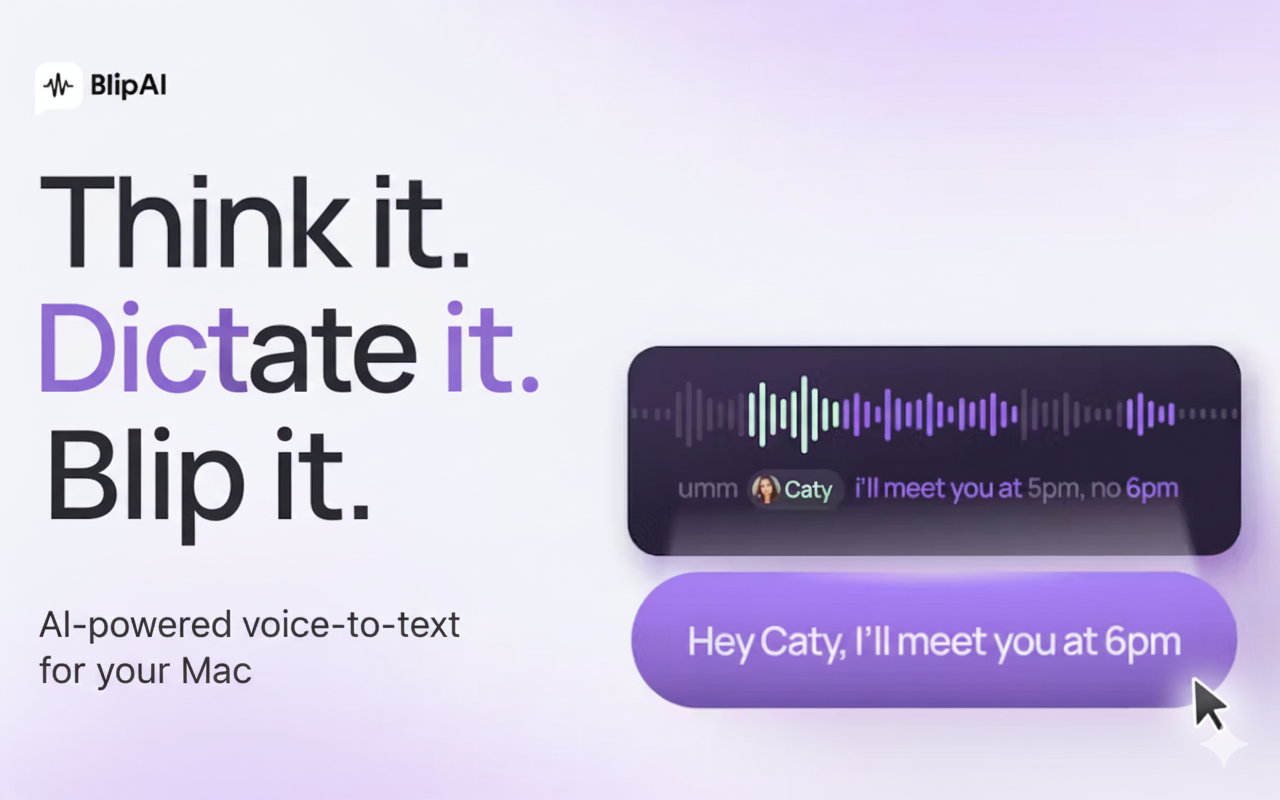
Blip AI is a Mac dictation app that lets you speak naturally and writes in your style across every application, 4x faster than typing. Tired of writing long prompts across AI tools? Use Blip AI as it senses the context and let you type with 100+ languages with your voice, Blip AI saves you hours of manual typing by producing perfectly formatted text instantly within any app. But How? Blip AI stays as a small blip overlay on your screen & listen by a shortcut (option + s) to insert text in any app 4x faster and better.

Token Governor Re-engineer LLM prompts to spend the fewest tokens that still answer — a governing gateway with auth, budgets, caching, and streaming that works with Anthropic, OpenAI, Gemini, and any OpenAI-compatible provider. Plus a live A/B, saved constraint presets, and a batch triage that flags prompts which never needed a model. llm · tokens · cost-optimization · ai-gateway · llmops · openai · anthropic · gemini · streaming · prompt-engineering Single mode — build a constrained request, see projected savings, and get a verdict when the wrapper costs more than it saves. Presets — save/load constraint configs; they persist in the browser. Batch mode — score a list of prompts, flag deterministic ones, export CSV/Markdown, and get a suggested script for each flagged row. Live A/B — runs your prompt twice (raw vs. governed) through a server-side proxy and reports real token counts, using whichever provider you configure. The app A fixed one-screen dashboard (no page scroll — panels scroll internally). The top bar carries the mode tabs and pricing/scale inputs; below sit three panels: Prompt & constraints — the prompt plus succinctness, output shape, temperature, and toggles. Projected savings — a gauge, a "worth it / costs more than it saves" verdict, and a before/after cost receipt. Assembled request & live A/B — the generated system prompt with copy buttons, and a raw-vs-governed A/B that reports the real token counts returned. Switch to Batch mode and this becomes a triage table that flags deterministic prompts. (The image is a layout mockup, not a screenshot — run the app for the live, interactive version.) Requirements Node.js 18+ (uses the built-in fetch) An API key for one LLM provider (only needed for the live A/B panel) Setup npm install cp .env.example .env # then edit .env (see "Providers" below) Providers The server is provider-agnostic. Set these in .env: Variable Purpose LLM_PROVIDER anthropic or openai (openai = any OpenAI-compatible API) LLM_API_KEY your key (kept server-side; never sent to the browser) LLM_MODEL model id your key can access LLM_BASE_URL optional; override to point at Gemini, Groq, OpenRouter, Ollama, etc. The frontend never changes: it POSTs a normalized request to /api/messages, and the adapter in server/providers.js translates to/from the chosen provider and returns a normalized response. To add a native provider, edit that one file. Supported providers Almost every provider now offers an OpenAI-compatible API, so it works by setting a base URL and model — no code change. Only providers you want to hit on their own native protocol need an adapter. Provider Supported? How Anthropic Yes native (LLM_PROVIDER=anthropic, or gateway /v1/messages) OpenAI Yes LLM_PROVIDER=openai Gemini Yes OpenAI-compat base URL (below) Groq, OpenRouter, Together, Mistral, Fireworks, DeepSeek, xAI/Grok Yes OpenAI-compat base URL Local — Ollama, vLLM, llama.cpp Yes OpenAI-compat base URL Azure OpenAI Mostly OpenAI-compat, but needs a different auth header + api-version Cohere / Bedrock / Vertex native protocols Not yet would need a native adapter in server/providers.js Examples All OpenAI-compatible providers use LLM_PROVIDER=openai: # OpenAI LLM_MODEL=gpt-4o-mini # Gemini (Google AI Studio) — NOTE: no trailing slash (the code appends /chat/completions) LLM_BASE_URL=https://generativelanguage.googleapis.com/v1beta/openai LLM_MODEL=gemini-2.5-flash # use a model your key can access # Groq LLM_BASE_URL=https://api.groq.com/openai/v1 # OpenRouter LLM_BASE_URL=https://openrouter.ai/api/v1 # Local Ollama LLM_BASE_URL=http://localhost:11434/v1 LLM_API_KEY=ollama Notes: Gemini trailing slash. Google's own docs use .../v1beta/openai/ because the OpenAI SDK appends chat/completions. This server appends /chat/completions, so drop the trailing slash or you'll get a double-slash 404. Some newer OpenAI models expect max_completion_tokens — set OPENAI_MAX_TOKENS_PARAM=max_completion_tokens if you hit that error. Model availability changes and varies by key; if a model 404s, pick one from your provider's current list. npm run check:live confirms the wiring end to end. Native Gemini SDK (generateContent) is not supported. If your app uses the Google GenAI SDK's native API rather than its OpenAI-compat mode, either switch that client to OpenAI-compat mode or add a native Gemini adapter (a body-mapper plus a :streamGenerateContent passthrough, parallel to the Anthropic adapter). Develop npm run dev Vite frontend on http://localhost:5173 Express API on http://localhost:8787 (Vite proxies /api to it) Build and run in production npm run build # outputs dist/ npm start # Express serves dist/ AND /api on PORT (default 8787) Pre-deploy check Confirm the key and model are wired before you ship: npm run check # hits a running server's /api/health npm run check:start # boots the server itself, checks, stops npm run check:live # also sends a tiny real prompt (costs a few tokens) Check a deployed instance instead of localhost: HEALTH_URL=https://your-app.example.com/api/health npm run check It verifies the health endpoint responds, the key is present, and a model and base URL are configured; --live additionally confirms a real round-trip. Exit code is 0 on success, 1 on any failure — so it drops straight into CI. Runtime gateway (integrate with a live app) Beyond the analysis UI, the server is also a governing gateway. Point your existing SDK's base_url at it and every call is governed automatically — constraints injected, max_tokens capped, deterministic prompts optionally blocked — then streamed straight back. Your app code barely changes. Native endpoints: Endpoint Protocol Upstream POST /v1/messages Anthropic Anthropic (or ANTHROPIC_BASE_URL) POST /v1/chat/completions OpenAI-compatible OpenAI / OPENAI_BASE_URL GET /v1/governor/info — lists policies + wiring (no secrets) Per-request control via headers: Header Effect x-governor-policy: terse pick a named policy (default, terse, strict, passthrough) x-governor-detect: block override detect mode (off / warn / block) x-governor: off bypass governance for this call Policies live in server/policies.js (instructions, maxTokensCap, forceTemperature, detect). Edit or add your own. Point your SDK at it # OpenAI SDK from openai import OpenAI client = OpenAI(base_url="http://localhost:8787/v1", api_key="unused") client.chat.completions.create( model="gpt-4o-mini", stream=True, messages=[{"role": "user", "content": "..."}], extra_headers={"x-governor-policy": "terse"}, ) # Anthropic SDK from anthropic import Anthropic client = Anthropic(base_url="http://localhost:8787", api_key="unused") with client.messages.stream(model="claude-sonnet-5", max_tokens=1024, messages=[{"role": "user", "content": "..."}]) as s: for text in s.text_stream: print(text, end="") (The gateway supplies the real key from its env; the SDK's api_key is ignored.) Streaming stream: true is passed through as Server-Sent Events, unmodified, with backpressure preserved. The gateway sniffs a copy only to log token usage — it never alters the bytes your client receives. Try it: node examples/stream.mjs # OpenAI-protocol streaming demo curl -N http://localhost:8787/v1/chat/completions \ -H 'content-type: application/json' -H 'x-governor-policy: terse' \ -d '{"model":"gpt-4o-mini","stream":true,"messages":[{"role":"user","content":"hi"}]}' Notes Blocking is opt-in. Only the strict policy (or x-governor-detect: block) blocks deterministic prompts; it returns a provider-shaped 400 with a suggested script. The detector is a heuristic — run it in warn first. max_tokens is the only hard lever — instructions are advisory, the cap is enforced. Usage logging prints a [usage] … line per call. For OpenAI streaming, set stream_options.include_usage=true (the demo does) or usage will read as zero on streams. Same-protocol upstreams. Use the endpoint that matches your upstream; the gateway forwards natively rather than translating between protocols (that's what /api/messages is for). Resilience. Upstream calls have a connect timeout and retry with backoff on 429/5xx (GATEWAY_TIMEOUT_MS, GATEWAY_RETRIES). The timeout covers connect/headers, not the stream body, so long streams aren't cut off. Multi-instance. Set REDIS_URL (and npm i redis) to share budgets and cache across replicas; otherwise state is per-process. Gemini through the gateway. Point the OpenAI upstream at Gemini's OpenAI-compat base and call /v1/chat/completions: set OPENAI_BASE_URL=https://generativelanguage.googleapis.com/v1beta/openai (no trailing slash) and OPENAI_API_KEY=<gemini key>, then use a gemini-* model. See the Providers table for the full compatibility list. Control plane: auth, budgets, cache The gateway is also a cost-control plane. All three are optional and layer onto the same /v1/* endpoints (the app's own /api/messages is unaffected). Auth. Define callers, each with a bearer key and optional pinned policy and budget, in gateway.callers.json (see gateway.callers.example.json): { "callers": [ { "id": "web-app", "key": "gw_live_...", "policy": "terse", "budget": { "tokens": 2000000, "usd": 20 } }, { "id": "worker", "key": "env:WORKER_KEY", "budget": { "tokens": 500000 } } ] } Callers send Authorization: Bearer <key>. A key value of env:VAR is pulled from the environment (so it can come from an injected secret). With no callers configured the gateway runs open (anonymous) — fine for local, not for production. A caller's pinned policy is authoritative: clients can't loosen it with x-governor-* headers. Budgets. Per-caller daily token and/or USD caps (UTC reset). When a caller is over, the next call gets 429 with Retry-After. Cache hits and the current count are free. USD caps need a pricing file (gateway.pricing.example.json → GATEWAY_PRICING_FILE); token caps need nothing. Check usage: curl -H 'Authorization: Bearer gw_live_...' http://localhost:8787/v1/governor/usage Enforcement is soft (checked before each call, recorded after), and the ledger is in-memory — single-instance. For multiple replicas, back server/budget.js with a shared store (e.g. Redis). Cache. Exact-match cache for non-streaming, deterministic calls (temperature <= GATEWAY_CACHE_MAX_TEMP, default 0). A hit returns the stored response with x-governor-cache: hit, skips the provider, and doesn't charge budget. Sampled (higher-temperature) and streaming calls are never cached, so you never get a stale non-deterministic answer. Bypass per request with x-governor-cache: off. Introspect the whole plane at GET /v1/governor/info. Tests npm test Dependency-free (node --test) coverage of the control plane — auth token checks, budget enforcement, and cache determinism/keying — runnable without a provider key. npm run check / check:live validate a running server's wiring. docker build -t token-governor . docker run -p 8787:8787 \ -e LLM_PROVIDER=anthropic -e LLM_API_KEY=sk-... -e LLM_MODEL=claude-sonnet-5 \ token-governor Secret externalization The API key is never hardcoded — it comes from the environment. There are two ways to source it from a managed secret store: 1. Platform injection (recommended, no code). Let your platform fetch the secret and inject it as an env var at deploy time. Nothing in the app changes: Cloud Run: --set-secrets=LLM_API_KEY=anthropic-key:latest ECS/Fargate: task-definition secrets from AWS Secrets Manager or SSM Kubernetes: External Secrets Operator / CSI driver → env var Azure App Service / Container Apps: Key Vault references → app setting 2. In-app fetch (built in). Point any *_API_KEY at a managed secret using a scheme, and the server resolves it at startup (see server/secrets.js):
AI Pair Programming in Your Terminal Aider lets you pair program with LLMs to start a new project or build on your existing codebase. Features Cloud and local LLMs Aider works best with Claude 3.7 Sonnet, DeepSeek R1 & Chat V3, OpenAI o1, o3-mini & GPT-4o, but can connect to almost any LLM, including local models. Maps your codebase Aider makes a map of your entire codebase, which helps it work well in larger projects. 100+ code languages Aider works with most popular programming languages: python, javascript, rust, ruby, go, cpp, php, html, css, and dozens more. Git integration Aider automatically commits changes with sensible commit messages. Use familiar git tools to easily diff, manage and undo AI changes. Use in your IDE Use aider from within your favorite IDE or editor. Ask for changes by adding comments to your code and aider will get to work. Images & web pages Add images and web pages to the chat to provide visual context, screenshots, reference docs, etc. Voice-to-code Speak with aider about your code! Request new features, test cases or bug fixes using your voice and let aider implement the changes. Linting & testing Automatically lint and test your code every time aider makes changes. Aider can fix problems detected by your linters and test suites. Copy/paste to web chat Work with any LLM via its web chat interface. Aider streamlines copy/pasting code context and edits back and forth with a browser. Getting Started python -m pip install aider-install aider-install # Change directory into your codebase cd /to/your/project # DeepSeek aider --model deepseek --api-key deepseek=<key> # Claude 3.7 Sonnet aider --model sonnet --api-key anthropic=<key> # o3-mini aider --model o3-mini --api-key openai=<key> See the installation instructions and usage documentation for more details. More Information Documentation Installation Guide Usage Guide Tutorial Videos Connecting to LLMs Configuration Options Troubleshooting FAQ Community & Resources LLM Leaderboards GitHub Repository Discord Community Release notes Blog Kind Words From Users "My life has changed... Aider... It's going to rock your world." — Eric S. Raymond on X "The best free open source AI coding assistant." — IndyDevDan on YouTube "The best AI coding assistant so far." — Matthew Berman on YouTube "Aider ... has easily quadrupled my coding productivity." — SOLAR_FIELDS on Hacker News "It's a cool workflow... Aider's ergonomics are perfect for me." — qup on Hacker News "It's really like having your senior developer live right in your Git repo - truly amazing!" — rappster on GitHub "What an amazing tool. It's incredible." — valyagolev on GitHub "Aider is such an astounding thing!" — cgrothaus on GitHub "It was WAY faster than I would be getting off the ground and making the first few working versions." — Daniel Feldman on X "THANK YOU for Aider! It really feels like a glimpse into the future of coding." — derwiki on Hacker News "It's just amazing. It is freeing me to do things I felt were out my comfort zone before." — Dougie on Discord "This project is stellar." — funkytaco on GitHub "Amazing project, definitely the best AI coding assistant I've used." — joshuavial on GitHub "I absolutely love using Aider ... It makes software development feel so much lighter as an experience." — principalideal0 on Discord "I have been recovering from ... surgeries ... aider ... has allowed me to continue productivity." — codeninja on Reddit "I am an aider addict. I'm getting so much more work done, but in less time." — dandandan on Discord "Aider... blows everything else out of the water hands down, there's no competition whatsoever." — SystemSculpt on Discord "Aider is amazing, coupled with Sonnet 3.5 it's quite mind blowing." — Josh Dingus on Discord "Hands down, this is the best AI coding assistant tool so far." — IndyDevDan on YouTube "[Aider] changed my daily coding workflows. It's mind-blowing how ...(it)... can change your life." — maledorak on Discord "Best agent for actual dev work in existing codebases." — Nick Dobos on X "One of my favorite pieces of software. Blazing trails on new paradigms!" — Chris Wall on X "Aider has been revolutionary for me and my work." — Starry Hope on X "Try aider! One of the best ways to vibe code." — Chris Wall on X "Freaking love Aider." — hztar on Hacker News "Aider is hands down the best. And it's free and opensource." — AriyaSavakaLurker on Reddit "Aider is also my best friend." — jzn21 on Reddit "Try Aider, it's worth it." — jorgejhms on Reddit "I like aider :)" — Chenwei Cui on X "Aider is the precision tool of LLM code gen... Minimal, thoughtful and capable of surgical changes ... while keeping the developer in control." — Reilly Sweetland on X "Cannot believe aider vibe coded a 650 LOC feature across service and cli today in 1 shot." - autopoietist on Discord "Oh no the secret is out! Yes, Aider is the best coding tool around. I highly, highly recommend it to anyone." — Joshua D Vander Hook on X "thanks to aider, i have started and finished three personal projects within the last two days" — joseph stalzyn on X "Been using aider as my daily driver for over a year ... I absolutely love the tool, like beyond words." — koleok on Discord "Aider ... is the tool to benchmark against." — BeetleB on Hacker News "aider is really cool" — kache on X
Your central AI hub to access the best AI models from one place.

Our AI finds products from public sources, then rotates exposure so useful newcomers have a fair chance to be seen.
Learn how discovery works